Windows

Cedar

Member
Windows key command list
Copy/paste into any .md editor/viewer.

For example for Windows Notepad
(Notepad Settings > Formatting ON to use Markdown)
  1. Copy all text as below
  2. Open Notepad
  3. File > New Markdown tab
  4. Paste
  5. View > Markdown > Formatted


**iReal Pro Windows Key commands**

v2026.5

|GENERAL||
|-|-|
|New song|Ctrl-N|
|Edit song|Ctrl-E|
|Duplicate song|Alt-D|
|Import|Ctrl-I|
|Print|Ctrl-P|
|Settings|Ctrl-Comma|
|Undo|Ctrl-Z|
|Redo|Ctrl-Y|
|Select All|Ctrl-A|

|View||
|-|-|
|Toggle Full screen|F11|
|Toggle Sidebar|Ctrl-` (backtick)|
|Player controls|Ctrl-Shift-P|
|Chord diagrams|Ctrl-Shift-C|

|Player||
|-|-|
|Play/Stop|Spacebar|
|Pause|Period|
|Tap tempo|Comma|
|Tempo +|=|
|Tempo -|-|
|Repeats +|]|
|Repeats -|\[|
|Style|Ctrl-Y|
|Transposition|Ctrl-T|

|Editor||
|-|-|
|Bar repeat|%|
|Double bar repeat|x|
|N.C.|n|
|Insert space|Ctrl-\||
|Delete space|Ctrl-Backspace|
|Cut|Ctrl-X|
|Copy|Ctrl-C|
|Paste|Ctrl-V|

|Barlines|||
|-|-|-|
||Left|Right|
|Single|Ctrl-B|Ctrl-Shift-B|
|Double|Ctrl-D|Ctrl-Shift-D|
|Repeat|Ctrl-R|Ctrl-Shift-R|
 
Last edited:
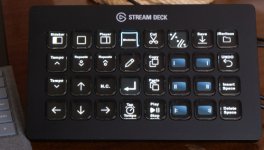
Stream Deck XL

SDXL photo.jpg


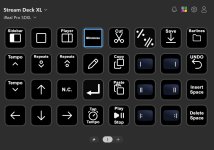
Some basic button mappings for Stream Deck XL (Windows).
Feel free to move them around or replace.

Play mode: Sidebars, Edit, Tempo, Tap tempo, Repeats, Play/Stop.
Edit: N.C., Barlines, single and double bar repeat (tap, double tap), Cut, Copy, Paste, Save, Undo, Insert/Delete space
Barline folder: only barlines, if you want to replace the six barline buttons with other key commands

StreamDeck XL iReal Pro buttons.jpg

(Will work on a Mac if you replace the key commands. There might be some inaccuracies of the formatting of the buttons, due to the differences in OS font type, sizing etc. which you can easily fix.)

ADMIN: we ran it through MS Defender, no problems found with the zip contents.
 

Attachments

Last edited:
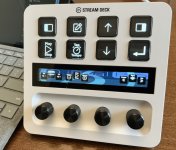
Stream Deck + (Windows)

SD plus.jpg
Accommodating dials and a few essential buttons. Feel free to modify it of course.


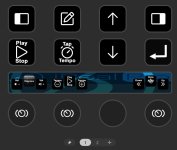
Page 1
Main screen: Sidebars, Edit, Play/Stop, Tap tempo, Up/Down, Return​
Dials: Windows Volume, Diagrams (push), Tempo, Style (and one spare)​

iReal Pro page1.jpg


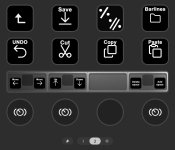
Page 2
Editor: Save, Single/Double bar repeats, Barlines folder, Undo, Cut/Copy/Paste​
Dials: Cursor up/down/left/right, Add/Delete space (and one spare)​

iReal Pro page2.jpg


Mac: replace key commands and correct any button format problems.


[To Admin again, feel free to check for integrity/virus scan etc.]

From ADMIN: checked all clean
 

Attachments

Last edited:

Eniac Flexbar​


(For anyone interested)

Playing around with Flexbar for iReal Pro (Windows. It would work with Mac using its relevant key commands.)
(No affiliation with the company. It looks like it was released in 2025 after a few years of development.)
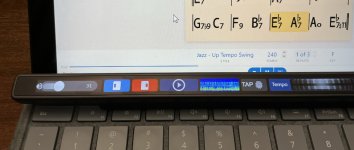
It's about 1ft/30cm long, slim. See their website for images.

Background Flexbar works in a similar way to how Apple Touch Bar worked on some Mac laptops a few years ago—the concept is revived in Flexbar.

Setting up buttons, dials and pages was reasonably easy using their free editor software Flexbar Designer in a similar way to setting up a Stream Deck, sending out key commands or loading another Page (screen) of buttons (for example a series of buttons purposed for Editing a song, shown below.)

I set up a button on my Home page,

Home1.jpg

added a Main page for the app, with a Windows volume slider and few buttons (to trigger key commands for the sidebars, Play, tap tempo, display diagrams.)

iReal Pro Home1.jpg

The (virtual) dials can be swiped (as if rotated) left and right like a real dial, sending out key commands (opposites) for changing Tempo and Repeats. This is similar to how Stream Deck Plus physical dials would work.

You can send out text by pressing a button, for example if you need to input the same composer name for a bunch of songs, tapping its button can act as a "paste" when editing song info.

Another option is possibly using one of the real time stats displays (between Play and Tap, showing an animated timeline graphic representation of the audio in real time, as a song is playing, although it seemed to be a bit buggy.) Whether this display is useful or not ... as you are presumably practicing, but fun to create and watch.

Flexbar live audio2.jpg

For editing, I made another page of buttons (key commands) for cut, copy, paste, repeat symbols, undo, the various barlines, a dial to swipe to move continuously through (the spaces of) the song from start to finish, Save and Done.

iReal Pro EDIT1.jpg

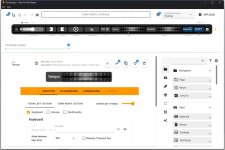
Flexbar Designer, setting up the Tempo dial

Flexbar full screen Flexbar designer1.jpg

The Flexbar has had occasional firmware updates with additional features added and seems to be actively developing (discussions at Discord). At time of posting this, firmware v2.2.3.
 
Last edited:
Back
Top Bottom