G'day Sam,
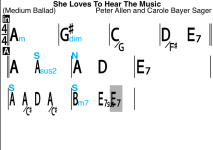
1. To get help with a chart, don't post an image, rather post the chart-in-progress correctly. That saves having to re-enter all the chords into the editor. I see you already discovered Small/Normal.
2. The player doesn't recognize sus2. It will play add2. Just using "2” as a quality (eg. A2) is something you can try also.
"sus4” is redundant. Using "sus" implies the fourth unless otherwise specified.
3. The player will work fine even though chords overlap.
PLAYER CHARTS vs. READER CHARTS
Start with the user instructions here: https://www.irealpro.com/support ** UPDATED FOR IREAL PRO ** (this is an old thread but this post has been updated for iReal Pro) Dec 2013 You do NOT need to register in order to download songs or playlists. To import from forums, open iReal pro on your...

forums.irealpro.com
4. The player gets confused by random numbers of spaces in a measure and it's not clear when the chord should play.
By doubling the number of spaces the player can figure it out. But...that can cause misalignment later in the chart unless spaces are also removed. I find it more difficult to follow charts that have measures that are different lengths than having a few chords that overlap a little. You can also copy the unreadable chord above as an alternate chord or just the quality below using text.
Neither affects the player.
Please review the layout conventions.
Chart Layout Conventions
https://forums.irealpro.com/threads/iReal-b-layout-conventions&p=301.194/#post-301
It's best to start a chart using a template, then highlight/cut unused bar lines at the end. (Not done in the example chart)
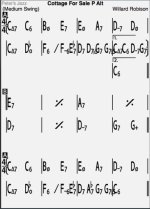
Example chart for the above suggestions
Beyond Small-Normal Chords - Example

)BOB