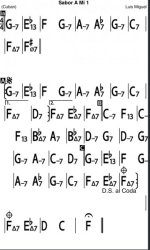
It's probably not worth the effort but I was looking at this tune thinking it would be easier to fix the layout if I could have (in edit mode) a blank song to cut and paste etc the chords with proper spacing on a fresh chart. Sabor A Mi 1 - Luis Miguel
When I write-out multi-page choral arrangements (so just by swiping through the next page(s), I can easily perform my part start to finish, top to bottom without various DS or other jumping back and forth in the chart not to mention the obligatory section with a key change...) I sometimes need to copy/paste sections between pages as well as transpose a section to add.
It's doable, just a little inconvenient to copy on one chart, save and close, edit another chart, paste...and so on.
Bearing in mind that this wonderful app is designed for a *PHONE*, I realize and accept that I'm coloring outside the lines... )BOB
As an exercise, I edited your chart on my iPad. Only took a couple of minutes.
First, count the measures. Decide how much "shrinkage" is neccessary.
I shortened the two-chord bars in the intro since it's played only once.
Highlight/cut unneeded blank space.
Insert spaces into short bars.
Highlight/insert space to conform to iRp posting conventions: https://forums.irealpro.com/threads/iReal-b-layout-conventions&p=301.194/#post-301
Editing form is faster than entering chords. It gets faster/easier with practice.
If you make a mistake, there's an undo button. )BOB



 )BOB
)BOB

