iReal Pro chart not reflecting my chosen key

BetsyBeeBop

New member
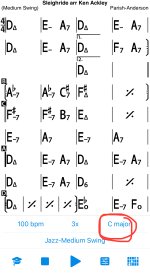
The key I set for songs does not match the chords on the chart. See for example the attached chart for the song "Sleigh Ride".

In my settings, the Transposing Instrument is set to "C (Piano, Guitar, Bass, Voice)" and I set the chart for the song to be in the key of C (see red circle in bottom right of attached screenshot), but the chart appears to be in G. What am I doing wrong?
 

Attachments

  • IMG_6362.jpeg
    IMG_6362.jpeg
    330.9 KB · Views: 4
Most likely, the default key of the song is set incorrectly.
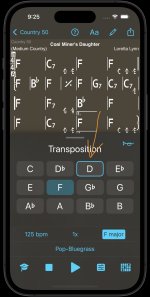
Looking at the transposition controls, the default key is the one with the blue edge:

RocketSim_Screenshot_iPhone_15_6.1_2025-11-17_09.25.07.jpg

It might for example be set to C (The default when you create a new song in the editor), but the song is actually in F.
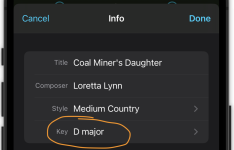
To fix this, open the song in the editor, tap on the circled 'i' and tap on 'Key'.
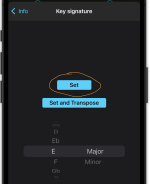
Select the correct key and tap on 'Set'. Save and exit.

RocketSim_Screenshot_iPhone_15_6.1_2025-11-17_09.26.08.png

RocketSim_Screenshot_iPhone_15_6.1_2025-11-17_09.26.22.png
 
Hi, thanks very much for this answer. I clicked Edit & the circled i and sure enough, the key was listed as G. I changed it to C and clicked Save. But the chart still doesn't show in C even though the blue circled key says C. Any help would be much appreciated!

IMG_6371.jpeg
 
Hard to tell exactly unless you attach the actual song in forum format, but it looks like the song was originally written in D major, so when setting the default key in the editor you should set it to D to match the song. Thereafter you should be able to transpose it to any key.
 
Back
Top Bottom